Julian Banks

Portfolio

Ahoy there! I'm Julian.

I'm a gameplay programmer, passionate about every aspect of game development.
I love collaborating with and learning from all disciplines to build systems that empower creative game design, focusing heavily on game feel to craft incredibly polished and satisfying player experiences.
As an Abertay University 2026 Graduate, I am eager to join a passionate community where I can apply my skills and continue growing alongside others, building memorable games together.

Reach out!
lemmiegames@gmail.com
▼ View some of my finest work ▼

Zen Grappling

A 2D grappling hook platformer prototyped in SFML C++, further developed in Godot C#.

Features:
• Complex player movement (pulling, swinging, swimming, walljumping, sliding).
• Screen wrap and room-based camera system.
• Dialogue systems, collectables.
• Many visual shaders that interact with the player, such as swaying grass and tree silhouette.
• Springs, gliders, bumpers, and many other movement based objects.
• Objects that interact uniquely with the hook, such as the cog that rotates the world.
• Ability to hold objects, some change player movement when held.

Zen Grappling

Contributions:
A solo project, all shown artwork and code is my own (Music and haiku sourced).

Context:
Originally a university project developed in SFML C++, I recreated the project in Unity C# due to familiarity for faster development. Then, when Unity introduced the runtime fee I recreated the game in Godot C#, which is what you see now. Refactoring the codebase each time based on what I learned from the previous iterations lead to smoother, more polished player movement.
The goal was to make fluid player movement that smoothly blends between different movement such as swinging, running, sliding, grappling, swimming, etc, within an interesting, dynamic world that the player can interact with.

Player state:
The player character uses a class state machine, inherited from a base PlayerState class, to determine how the player should move given the current context. This gives me the control to manage state changes based on the current state's possible transitions. Originally, the state machine used enums, though containing all the movement and transition logic within a single class was not scalable enough for the project.
I believe that the finely tuned transition requirements between states, along with the large number of different animation frames, squash and stretch, and momentum-based movement lead to smooth looking and feeling movement that I am very satisfied with.

Shaders:
Zen Grappling uses multiple shaders throughout to create more dynamic and interesting visuals.
The grass shader animates grass tiles back and forth to simulate wind, with an x offset based on world position so wind travels over time. The players collision box is drawn to a separate texture each frame with the opacity depending on speed and the colour depending on the sign of the horizontal velocity, which is also faded out each frame. This texture can then be used by the grass shader to know if it should be pushed down by the player, in what direction, and by what magnitude depending on how recently the player moved there and their speed.
There is also a tree shader that shows the players silhouette when behind it. The way this works is the players sprite (with skew, rotation, and scaling) is drawn to a separate texture, which is then passed into a tree leaves shader and each tree in the room checks if the players colour is in front of it. If so then change the colour to black to show the player silhouette. It was done this way as other things can overlap the player so if it was done on the player then silhouettes would be drawn in the grass.

NPC Movement:
For the fox NPC seen in the first video, the movement is based on my previous movements saved to a text file. It works by saving relevant data (such as position, sprite frame, scale, rotation etc) to a queue every set timeframe, and then interpolating between points each frame to recreate the movement.
This allows me to create more intricate, realistic movement for NPCs, such as a chase scene, and could also be used to recreate player movement for replays or ghosts in a time trial setting.
Initially i wanted to just record the inputs and the time of those inputs as then i could recreate movement with less filesize, but as Godot's physics engine is non-deterministic, meaning the same inputs do not always yield the same results, it was not reliable to do it that way. I can still reduce filesize by increasing the time gap between recordings at the expense of accuracy.

Dronescape

An incremental game about collecting gems and blowing everything up, set in a procedurally generated destructable world. Explores GPU-based falling sand simulations with playable mechanics, developed in Godot C# for my university honours project.

Features:
• Compute shaders for falling sand and fluid simulations.
• Interactable player character.
• Upgrade tree system with many visual shaders.
• Procedurally generated infinite world with different biomes and ores.
• Compute shader for collecting particles.
• Tutorial that waits for players inputs.
• Incredibly large explosions.
Play on Itch

Dronescape

Contributions:
A solo project, all shown artwork and code is my own (Music sourced).

Context:
Final artefact for my university honours project, researching how falling sand simulations with a playable character (inspired by Noita) perform at large scales on GPU architecture.
Honours Project Proposal and Execution Grade: A+
Honours Project Dissertation Grade: A+
Here is an abstract excerpt from my dissertation:

Background:
Existing research into GPU accelerated falling sand simulations have proven to be effective while largely focusing on traditional sandbox environments. However, recent CPU implementations have integrated more interactive gameplay mechanics; the implications of these systems on GPU architecture, including the communication overhead, are largely unexplored.
Aim:
To research different use cases and optimisation techniques for cellular automata within games contexts. From this, identify and evaluate bottlenecks in scalability and the impact of CPU – GPU communication on a playable, GPU-based falling sand simulation.
Method:
An application was developed using Godot 4.5 C#, demonstrating falling sand, particle, and fluid simulations on the GPU. Including a player character, procedurally generated terrain that is partitioned into chunks and loaded around the camera to give the illusion of a large persistent world, and a testing menu for consistency when measuring results.
Results:
Scalability was bottlenecked by the cellular automata-based fluid simulation on the GPU, while the CPU – GPU communication overhead contributed a larger percentage of the total frame time at lower simulation sizes.
Conclusion:
The bottleneck of a GPU-based simulation mainly depends on the workload (simulation size and per-cell attributes), the complexities of the systems, and how well those systems can map their memory to GPU architecture. Simple processes and minimal workloads are likely to be bound by the serial data transfers (Amdahl's Law), while memory intensive systems and large-scale workloads are likely to be bound by the parallel fraction (Gustafson's Law).

Final thoughts:
Overall, I am very satisfied with the final result. Not only for the honours itself, but also the additional features that make it a polished, playable game, such as the upgrade tree.
To be honest, during my time at university, the parallel programming module and graphics module were some of my least favourites; by the end of them I wasn't satisfied with how well I understood the topics. This made not choosing one of the lecturer provided topics and instead decide to create dronescape for my honours a risky decision, but I'm glad I did. GPGPU is not an easy undertaking and it certainly was a challenge, but I had the idea of large scale incremental falling sand (see also Sand Game on my portfolio) and was willing to do whatever it took to see the idea through. I am confident that the skills I learned over the course of developing dronescape will further the possibilities for great design ideas I can turn into reality in the future. Parallelisation and the GPU has huge potential for creating massively dynamic video game worlds that ignite the players curiosity, creativity, and satisfaction.

Toppling Tanks

A top down party game inspired by Bopl Battle and Wii tanks, prototyped in Unreal Engine C++, further developed in C# Godot.
Powerups include:
• Movement: portals, grappling hook, dash.
• Attacks: suckerpunch, wall-spawning bullet, bomb, bouncing bullet, growth ray, shrink ray, and mortar (arcing) bullet.

• System to swap out powerups, each with a unique cooldown.
Powerups are designed with combinations in mind, allowing for creative expression when playing.
• Wall spawning bullets hitting a bomb cause a wall explosion.
• Grappling hooks can go through multiple portals.

Toppling Tanks

Contributions:
A solo project, all shown artwork and code is my own.

Context:
Originally a university project developed in Unreal C++, I recreated the project in Godot C#.

Powerup System:
The powerups use inheritance to reuse common functionality such as cooldowns and references to the tank using it within a BasePowerup class. Then when I want to add a new powerup I only have to create the unique features with the cooldown timer and functions for pressing and releasing the powerup button already handled.

Bomb Explosion Pooling:
One issue I ran into was that the game would hang for a frame when a bomb exploded, which was made worse when multiple bombs chained explosions. This was because I was duplicating the explosion texture so that the explosion shader didn't impact all instances within the scene, and then creating a new noise texture to ensure all the explosions looked unique. Doing this, especially creating the noise texture, caused the game to lag. The way I solved this was creating an explosion material pool. By creating a set number of explosion materials at the start, I could use a manager class to return unused materials and as explosions only lasted a short duration, they could be reused quickly. This stopped the need for generating new textures while still looking unique as they all are assigned a different noise texture from the start.

Juicy Walls:
For the walls, I created a pixel art texture in blockbench. Then, using an existing normalmap, I sampled colours and manually created a normalmap version from my original texture. This makes the wall look significantly more interesting, not just flat, paired with an out bounce easing and ascending sound effects for creating them, the satisfaction of using the wall powerup increased dramatically.

Portals:
Each object that can teleport using a portal has an ITeleportable interface with a function for teleporting when it hits a portal. This may sound like overkill; to begin with the portal handled teleporting of all objects that hit it, but this quickly became too large of a class due to the surprising number of unique ways I needed to handle teleporting. The player should be sent out the exiting teleporter with enough speed to not still be touching it even if holding the other direction; bullets velocity need to be flipped depending on the difference in portals directions; the growth ray means that some objects are too big to fit in the portal, and objects like the punch or grapple need to keep track of how far they have travelled even when travelling through multiple portals. The grapple has a stack of portals travelled through and calculates the distance based on all the portals travelled through, while also creating a new Line2D for each one to still render the rope at each point. That way when it retracts it can retract back through each portal rather than just returning to the player.
Portals attached to walls can be enlarged when a growth ray hits the wall, and any object travelling through different sized portals gets the scale difference applied to them. It ended up being quite a complicated system!

Climbing Archer (WIP)

A 2D 'getting over it' style game with a bow, bounce on the bowstring and land on your arrows.

Features:
• Unique player movement with a bow that bounces the player when colliding with terrain.
• Custom keybind options that save across sessions.
• Dialogue system with unique voices, talking speeds, and player options.
• Adaptive music system based on progression and player movement.
• Multiple interactable NPCs and objects that give hints and items.
• Multiple 'enemies' that interact with arrows and the player.
• Different 'levels' with unique art and interactable elements, such as wind, moving platforms, NPCs etc.

Climbing Archer

Contributions:
A solo project, all shown artwork and code is my own.

Context:
A personal project currently being developed in Godot C#. I have identified overscoping as one of my weaknesses as a developer. My goal is to turn this project into a small game with strict considerations for scope, to publish on Steam. For this, I can also reuse and extend systems I have already created such as the player movement and dialogue systems from Zen Grappling.

Dialogue System:
Each NPC with dialogue in the world has a DialogueSpeaker script that contains their speaker ID, sound effect, pitch, talk speed, and a reference to their sprite to animate them. They add themselves to the DialogueSpeaker group on start so that when a dialogue is triggered, it can find the relevant speaker by ID in the group.
Dialogue is stored in a text file, and each dialogue trigger has a serialized/exported reference to its dialogue file. This makes it easy to add new dialogue as I just have to create a new text file and object to trigger it, while allowing for different characters to behave differently while talking. The text files contain blocks of text with their speaker beforehand and the choices/next dialogue after, denoted by specific characters I wouldn't use in the dialogue, such as double colons (::). The game then goes line by line through the text file, passing the text to a speech bubble to be read until it hits an option or the end of dialogue.
The speech bubble loops over each character within the lines it gets passed and displays each character with a sound effect, delay, and pitch variation depending on the speaker.

Music System:
I was considering using royalty free music for the game given the shorter scope I'm giving myself. However, I wanted to make the music dynamic and fit the different areas of the game while still having similarities between the tracks. For this reason I have produced some music for the game (and more to come..) as well as creating a system for playing them. The music manager has functionality for creating and removing audio players to play different layers of the song at the same synced time, meaning that as the player progresses, layers of the music (with different instruments) can be added to give a sense of progression and keep the music from feeling too repetitive.
As it's a rage game, while the player falls, the music becomes more distorted as well :).

Sand Game

Incremental style game where you click to turn a structure to sand, collect and buy upgrades to destroy structures faster.

Features:
• Miner NPCs that move along an image to mine the image high columns.
• Collectors that move to the closest sand piles and collect them.
• Upgrade system to buy more little guys, deal more damage, and collect or damage in a larger area with the cursor.
• Construction system that builds on top of existing buildings with animations.
• Testing sandbox featuring many different interacting elements.
• Little guys that break, collect, and build.

Sand Game

Contributions:
A solo project, all shown artwork and code is my own.

Context:
A personal project developed in Godot C#, inspired by the incremental genre and falling sand games, I wanted to combine the impressive visuals of falling sand with an incremental progression system. However, part of the enjoyment of incremental games is seeing the number scale exponentially bigger as you progress, which can quickly become an issue of performance with falling sand without careful optimisations. For that reason I decided to take this idea forward for my university honours project, which you can see the result of in Dronescape.


Falling sand:
There are two sprites in the scene, one for the structure and another one that starts empty for the falling sand. Clicking converts your click position into pixel coordinates and reduces saturation of the structure in a radius around the click position. Once the saturation of a pixel reaches zero, it is removed from the sprite and added to the sand sprite. All pixels in the sand sprite check if the pixel below is clear and moves down if so. If not, the pixel then checks diagonally down left or right and moves there instead, which causes the sand to pile into dunes.
During development I realised that the order of processing the sprite makes a big impact on the way the sand falls. Checking from bottom to top is important to avoid sand getting stuck on top of other falling sand, and horizontal order changes the outcome too. Alternating between left right checks and switching the order every process step made the sand fall most realistically.

Other elements in the sandbox have similar simple interactions, liquids check left or right instead of diagonally, gasses act the same but reversed vertically (and added random left/right for extra floatiness). These material types are stored as an enum within a particle struct also containing: density, lifetime, and temperature. The sprite is a 2D array of these particle structs.
I chose to hold the data for the particles in a struct rather than a class due to structs being a value type rather than reference, meaning it is contiguous in memory and looping over the grid of pixels becomes much more efficient due to less cache misses. I later learned that opting for a data oriented design approach would be even more efficient as storing all pixels individual characteristics (density, lifetime, etc) in separate arrays further reduces cache misses in parts of the code where only a few characteristics are read.

Optimisations:
The first optimisation was to keep a list of active pixels to iterate over rather than checking the whole image, removing pixels from the list when they had nowhere to move and readding the ones above when removing pixels. Next, I learned how Noita handles their falling sand and used spatial partitioning to break the image down into smaller chunks to only process chunks that have pixels in them. This allows me to keep a rect that covers all the pixels per chunk and iterate over the rects instead, which is more efficient as having a single list can become incredibly large and not cache friendly when the pixels are not ordered by position. This also allowed me to parallelise the simulation as parallelising each pixel would not be efficient due to pixels having race conditions checking and moving into neighbouring cells. Chunks can be parallelised in four passes so that no adjacent chunks are being processed at the same time, though this does require either a second buffer or a simple bool to check if a pixel has already been updated this process step as pixels can move into other chunks and get processed twice.

Penguin Voyage

A mobile roleplaying game made with Unity C# and published on the Playstore.
Features:
• An inventory of characters, each with unique stats, names, equipped items, and levels that all save across play sessions.
• Systems for showing the players specific penguins in the main menu ship scene, cutscenes, and battles.
• Datetime based offline rewards.
• Many special characters and enemies with unique attacks and status modifiers.
• 10 cutscenes, achievements, daily rewards.
• Optional reward ads.

Penguin Voyage

Contributions:
A solo project, all shown artwork and code is my own.

Context:
A personal project developed in Unity C# and published on the Play Store (now delisted). My first game developed not following a specific tutorial, prior to University. It gave me a good insight into different aspects of game development, the artwork, music, localisation, setting up a store page, and actually releasing a finished game.

Reflections:
As it was my first game, there are lots I would have done differently if I were to do it over. Firstly, the scope of the project was very large for a first game. When I started development, I went in with the intention of seeing how far I could get without a specific tutorial; I was sure that I wouldn't be able to create certain aspects... and then I did. This gave me the confidence to dive head first into things to figure them out when I'm unsure, something I still follow to this day (see Dronescape). Though, having much more experience now, I am better able to plan in advance to better manage my time.

Penguin Voyage also taught me the importance of developing tools. Each level in the game (of which there are more than 100) was painstakingly designed, tweaked, and tested by hand. In hindsight, it would have been so much quicker to design a tool to automatically test and balance enemy levels. Again, a plan helps.

Though, one of the hardest lessons I learned from Penguin Voyage was that, much like the crew of penguins within the game, you can't do it alone. Game development is collaborative; the best ideas often come from iteration, bouncing ideas off of one another in a team, and getting feedback from players. Getting feedback for the games I have put so much time and effort into can be intimidating, but the gamejams I have since had the privilage of being a part of have taught me that it can be the most rewarding too. Even for solo-developed games, having the faults of your ideas being exposed is essential, being open to ideas changing and evolving is part of making a great game even if it can be difficult at times. Since Penguin Voyage, I have spent a lot more time getting feedback from players and developing games alongside my peers at university, and it has deepened my appreciation for game development and great games a whole lot.
Penguin Voyage will always hold a special significance as my first game.

Penguins:
Penguin data that needs to persist across play sessions is stored in a class with their instances also having an ISavable interface, which is called for each object within the scene when the game needs to save or load. This allows for the game to call save on all objects that require it at once.

Each penguin has a profession, represented as an Enum and used multiple times throughout the game.
Penguins in battle inherit from a base PenguinAttack script with functionality for the specific professions in their derived classes. A dictionary with the profession enum as the key is used to instantiate the correct penguin type during battle.
The profession enum is also used in the main menu and in cutscenes to get the value of what sprite the penguin should have, so that the players' penguins appear in the cutscenes. This is possible as the cutscenes use Unity's animation system rather than being videos.

Slay n Saute

A turn-based RPG where you cook the creatures you have slain, crafted in a team of 7 using Unity C#.

Features I created:
• Cooking simulation including chopping (implented using a package), marinating, skewering, frying.
• Cooking instructions that update with player actions.
• Polish, including the animation for moving ingredients to plate, background characters, initial customer pop-up, skewer, flipping kebabs etc.
• Hint system for cooking, including silhouettes of interactables.
• Cooking score based on players actions.
Play on Itch

Slay n Saute

Contributions:
Developed in a team of seven, I was responsible for the cooking simulation, the individual actions (chopping, marinating, skewering, frying, serving) as well as the ordering of the tasks and hint system. We used a package for splitting the mesh while chopping.

Context:
A university project developed in Unity with C#. We were assigned a games company as a client who gave us a prompt to build the game around. Communicating with the client, testers during playtests, and our lecturers to refine the game based on feedback.

Hints and Guidance:
We wanted the cooking to be exploratory and not hold the players hand too much, From the first playtest a lot of the enjoyment came from figuring out how to cook the meal on your own.. and if you wanted to chop the carrot into a million pieces you could do that too (because that happened a lot).
While there were limitations, you couldn't 'lose' cooking. The risk of having it more open to exploration is that the player may not understand what to do, which can quickly lead to frustrations and understanding may vary with players' previous cooking experience. To ease this, there were a number of small changes and additions made, one such being the silhouettes of objects when holding an item to show where it would go if you clicked with it, what it could interact with. This was done by duplicating the object's visual components when it was picked up, with a translucent shader applied to the clone and then positioned based on a raycast from the cursor position, depending on what it hit and what was interactable by the current object. The clone was then destroyed when the player interacts with the item.

Another addition was the hint lights that shone on where the player should interact next to progress the cooking and was based on what current tasks had been completed as well as what the player was currently holding. This required careful tweaking from watching playtesters to ensure it wasn't too delayed or too pestering.

One final addition to make it easier was making all the objects in the scene easily movable without breaking the logic of the tasks, to allow for designers to adjust the cooking layout easily based on game flow and what logically makes sense next to each other.

Polish:
Another thing we learned from the playtests is that the players found chopping the ingredients super satisfying and we wanted to lean further into it; combat would be the tension and cooking is the release. No lose condition, relaxing music, player can play at their own pace. To further this goal I implemented a number of small elements of polish to improve player experience.
The first is the animation of moving the ingredients to their own plate after chopping as before they would just teleport there all at once. I changed that to be an animation teleporting one after another in a coroutine with a short pop sound, random velocity and above the plate so that you could see it fall. This leaned further into the many players who liked chopping the ingredients really small as the animation would play longer and be more over the top for the number of ingredients being added.
Skewering the ingredients felt flat and uninteresting, for this I added screen shake whenever the player skewered. I also made the skewer animation draw back quickly and accelerate, exaggerating the aggressiveness of the movement really helped give weight to the players click, you could feel the skewer being thrusted down. There is also a 'skewer buffer' implemented so if the player clicks towards the end of the previous animation it stores the input for a short duration and still performs the next skewer, to avoid the frustration of clicking slightly too early and nothing happening. Furthermore, I added a shadow below the skewer that animated when it's hovered over an ingredient via raycast, which helped reduce the frustrations of missing an ingredient.
Another small thing we couldn't have known without playtesters is that the freedom would also inspire players to do things we hadn't expected, like chopping the tablet that had the cooking instructions on it. To play into this and avoid players expecting something and not being rewarded for it, I added a glitchy animation with a sound effect to chopping the tablet. It was a small thing most players had no idea about, but seeing the reactions of the players who did find it made it all worth it.

Paul Kart

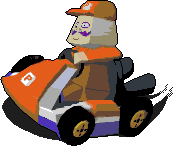
A Mario Kart inspired racing game made in a team of 3 on PS5 devkits using a University in-house engine.

Features I created:
• Track system that allows for different layouts, visuals, and lap counts.
• Track terrain types: road, offroad, out-of-bounds with falling animation.
• Track objects: tree, wall obstacles, boostpad, itemboxes.
• Track design for majority of the tracks.
• Created and implemented models.
• Implemented sound effects and music.
• Animated results screen including positions and estimated times for NPCs that have not finished.

Paul Kart

Contributions:
Developed in a team of three programmers, I was responsible for creation of the tracks (including obstacles, itemboxes, boostpads etc), as well as all models (besides from the police car model), player steering animations, race results screen, and implementing sound effects + music.

Context:
A university project developed on PS5 devkits using Abertay's in-house engine Skateboard (Entity component system C++).

Lighting and Models:
Though not a programming specific issue, one of the big limitations of the engine is that it only supported one light. This was a pretty big issue as it meant that even with a directional light, more than half of the game would be in complete darkness. To get around this issue, I created all the models with the limitation in mind. Firstly, we used a directional light pointing straight down to illuminate the ground and top faces of the models. Then I created the models with slanted vertical surfaces so that they were always facing at least slightly upwards, causing them to be illuminated. This is why the walls are slightly slanted and the characters are slightly cone shaped, though not that noticeably.

Track Generation:
Tracks are generated using a 2D array representing track tiles that are looped over and instantiated into the world. Track tiles contain lists of the objects within them, such as boostpads, itemboxes, and obstacles like trees. They also contain any colliders like offroad, pits, and walls. This allowed us to quickly create tiles that we could reuse for a variety of track layouts, easily enough that another developer could also help make layouts. Finally, tracks also contained a theme enum so that the tiles could be instantiated with different textures depending on theme, allowing for unique looking tracks while using the same system for generating them. This system also made it easy for the programmer responsible for AI and race logic to implement invisible checkpoints on each road tile for counting when a racer had completed a lap.

Golf For It

• Gamejam team of 5
• Procedurally generated sidescroller terrain

Play on Itch

Golf For It

Context:
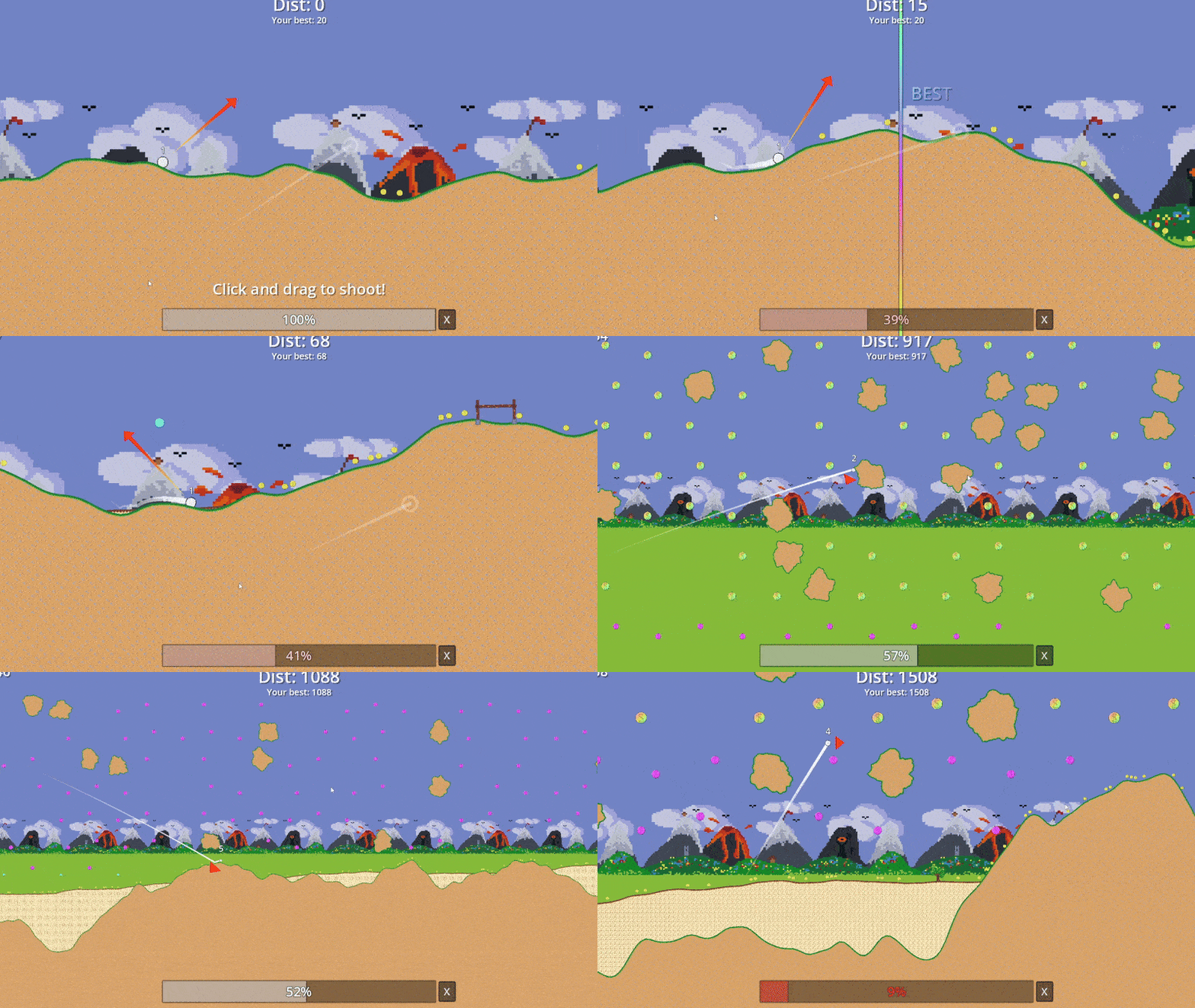
Created using Godot C# in a team of 5 for a gamejam of the theme 'no limits'. We created a golf game where the player has a limited time to hit the ball as far as possible, with powerups to increase the time, power, number of shots etc with no limit.

Contributions:
I created the procedurally generated sidescroller terrain, including different elements (grass, sand) that have different effects on the ball, obstacles placed along the ground, as well as coins on the ground and in the air, and finally floating islands.

Terrain scales to be harsher the further the player progresses, sand occurs more frequently, more obstacles, more of an incline and more severe differences in height, floating islands spawn more frequently but so do high value coins.

Terrain logic:
The terrain is made using a Polygon2D node as well as a Line2D for the outline texture. The height is determined by one dimensional noise with the X position passed in, multiplied and added to by a factor of the distance to make the terrain steeper and more varied the further the player progresses. The same thing is done for sand on another layer but with different values so I can control how often sand shows above the ground.
The terrain is broken up into two chunks, when the player is near the end of the second chunk the first chunk is moved to the right and updated with the new X position to give the illusion of a continuous ground. This also happens in reverse in case the player attempts to go backwards.

Floating islands are textured the same way but are generated by sampling points at regular intervals on a grid, those positions are passed into a two dimensional noise function and if it's above a certain threshold (that decreases with progress) then an island is created there.
Islands are a Polygon2D with noise applied to each point on the circle to make it look more random, their positions are offset based on their position in the grid so that the grid shape isn't visible and it further looks more random. Where there isn't an island, there is a chance to spawn a coin there instead.

Future development:
After seeing the success of Golf For It at the play party as well as other players feedback, another developer and I have decided to continue development. While development is still early, we have brainstormed progression systems, additional mechanics, levels, and refinements to turn it into a full game. Currently, I am swapping out the terrain for a more robust and scalable system with destructable marching squares, so that the player can further interact with the terrain. I have parallelised the terrain loading based on camera position and camera zoom to handle fast player movements more smoothly, with a terrain chunk obstacle pool to reduce overhead from instantiating and destroying objects.

Trick or Track

• Gamejam team of 4
• Procedurally generated top down terrain
• Player movement

Play on Itch

Trick or Track

Context:
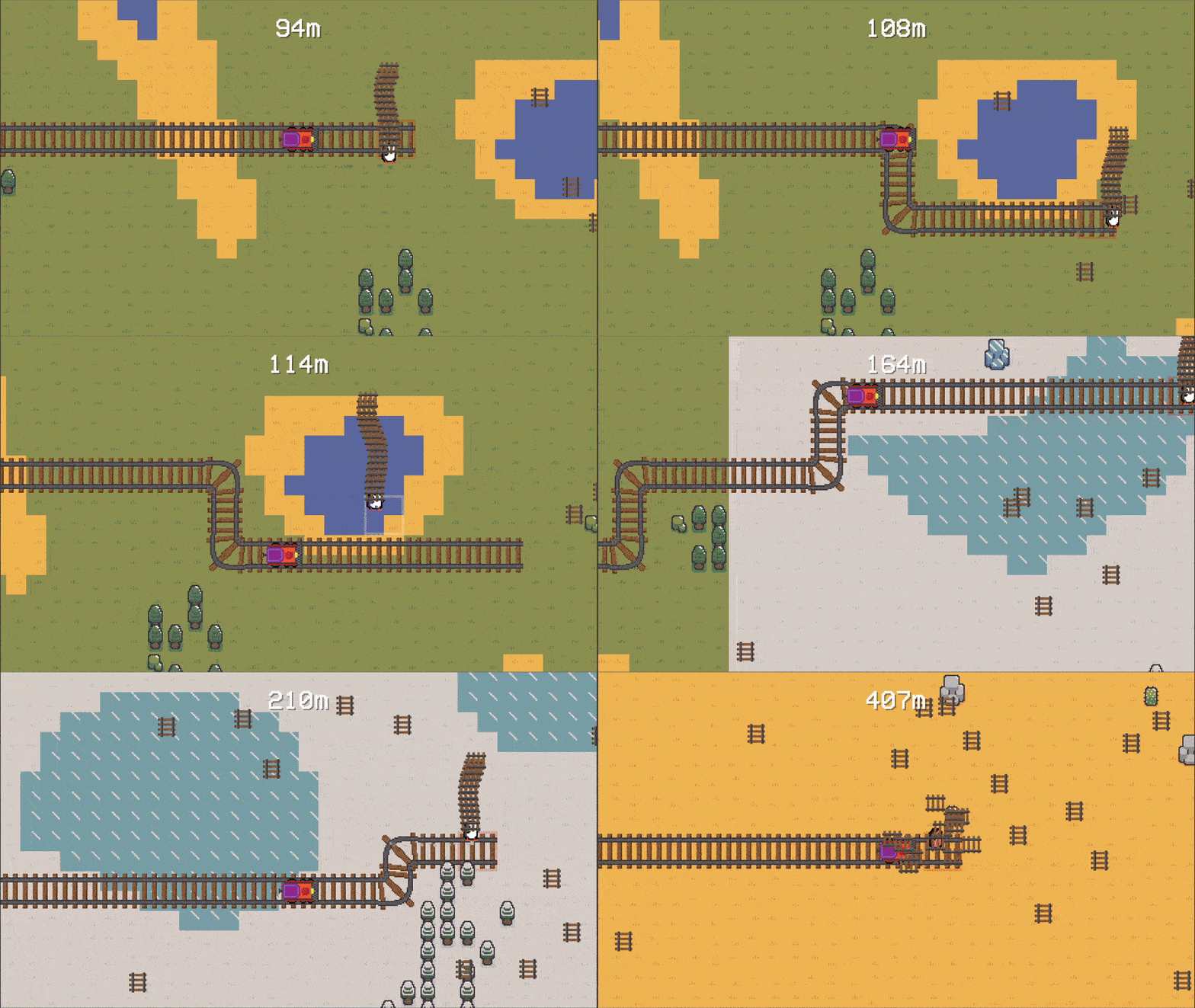
Created using Godot C# in a team of 4 for a gamejam of the theme 'no end'. The game has the player collecting track items around the procedurally generated terrain and placing them in front of the train, steering it to avoid crashing.

Contributions:
I created the top down player character that can move and dash as well as the procedurally generated top down terrain.

Terrain Generation:
Terrain is generated in a scrolling tilemap before coming into screen view and removed after leaving. The type of tile depends on its position in a 2D noise function, having different cutoff points for different tiles such as water, sand, and grass produces a nice looking area of water surrounded by sand.
Obstacles on top of the terrain that block or deal damage to the player is based on a separate noise value to ensure that the pathway can never be completely blocked.
Every set distance the biome will change between grasslands, tundra, and desert. This changes out the tiles being spawned and offers unique challenges. Grassland has water that slows, tundra has slippery ice, desert has cacti that stun the player on contact.

Player Character:
As we had no artists on our team, we had no animations for the player. To make the player look less static I added a squash and stretch animation on the player while they moved, as well as a quick rotation animation when the player rolled.

The tile the player is standing on impacts their movement as well as the colour of the particles below their feet. This is implemented by having custom tile data for friction, max speed, particle amount, and particle colour for each tile, then converting the players position to tilemap position and getting the data of the tile below the penguin to update the particles and movement.

Planterrible

• Gamejam team of 5
• Randomly generated mazes
• Enemy NPC logic

Play on Itch

Planterrible

Context:
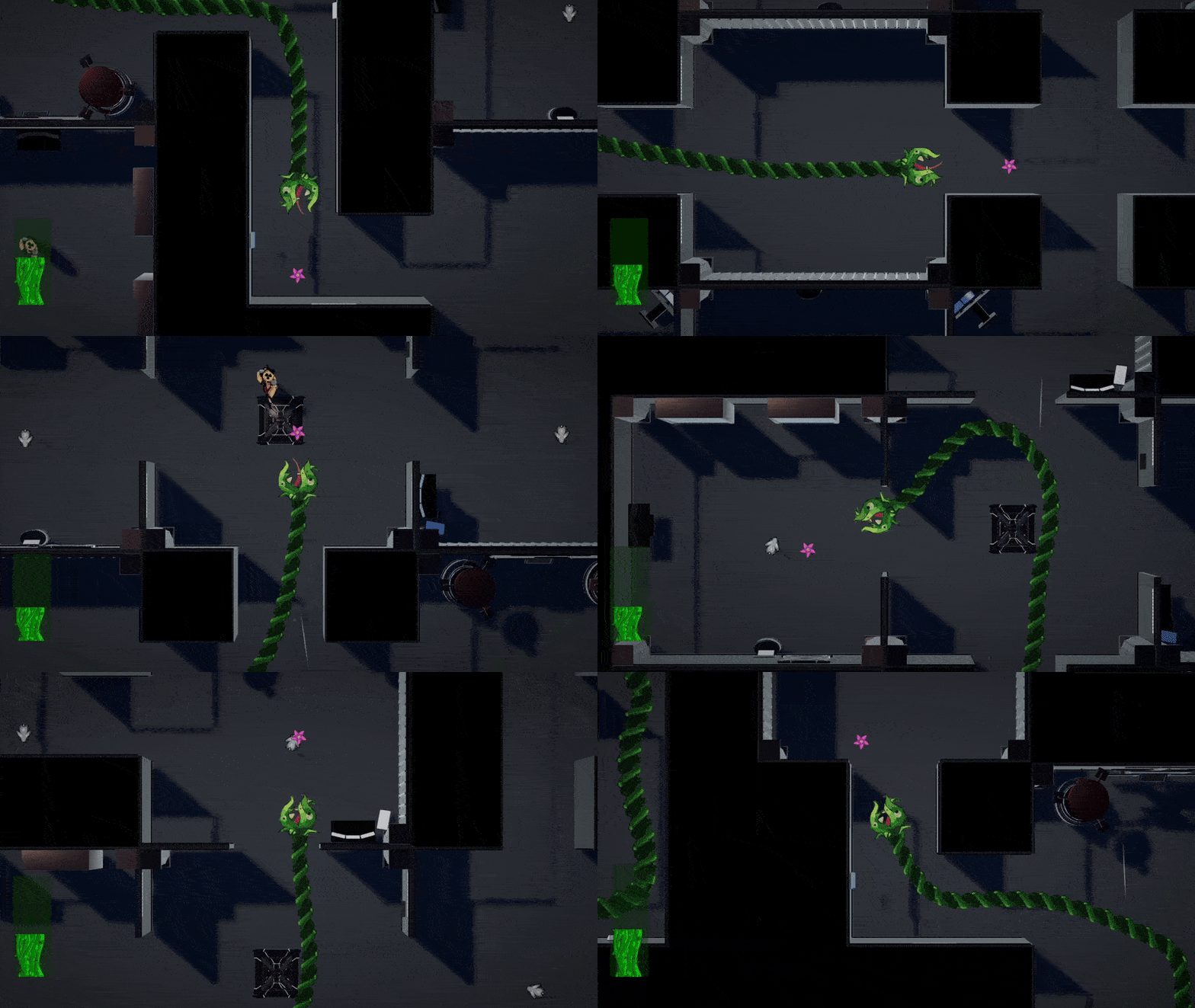
Created using Unity C# in a team of 5 for a gamejam of the theme 'roots'. The game procedurally generates mazes for a plant monster to navigate. The plant monster has limited length and can be expanded by eating enemies. Furthermore, the player can retract to regain length and change course.

Contributions:
I made the random maze generator as well as the enemy NPC spawning and movement logic.

Maze Generator:
The maze is made up of a 2D array of rooms. Rooms are stored as a struct containing bools for if they have been visited during creation as well as which of the four walls are open.

The program then starts at the starting room and gets a random neighbour of available neighbours, meaning they are within the bounds of the maze size and have not already been visited. It marks on both rooms an opening between them, marks the starting room as visited and adds it to a stack, and then continues doing this in a loop until it reaches the target room.
If this process ends up cornering itself and there are no available neighbours, it will have created a dead end and then pops from the stack until it has a room that does have an available neighbour, this way it always reaches the target room.

This process works for creating basic mazes, but the problem is the pathways are often too linear as most rooms will have only two exists. To get around this problem, after the previous steps are taken the program then divides the game world into four quadrants, picks a set number of random rooms in each quadrant, and checks if there are neighbouring rooms that aren't open (if there's a wall in the way). If so then it will mark the wall as open, creating new pathways through the maze and making it less linear.
The world is split into four quadrants to make the randomness more even over the world as otherwise one section may become too open with another section being too linear.

Each room has a chance to create an enemy, with the odds increasing every time an enemy is not spawned and resetting when one is. This is to ensure that maps can't be impossible (as enemies feed the plant and are needed to keep progressing).

Enemy NPCS:
Enemies are stationary until they have line of sight to the plant via raycast. Humans will fire at the plant and pursue it if the plant is distant, such that the player can draw the human in if they can't reach the player. The human will walk backwards if the plant is too close. Bunnies work off of the same system but will turn to face the plant if they have line of sight, and will turn to hop away if the plant is too close.

Graphics in DX11

• Solo university project
• HLSL in DirectX11

Graphics Programming in DirectX11

Context:
A solo university project created with HLSL shaders in DirectX11.

Features:
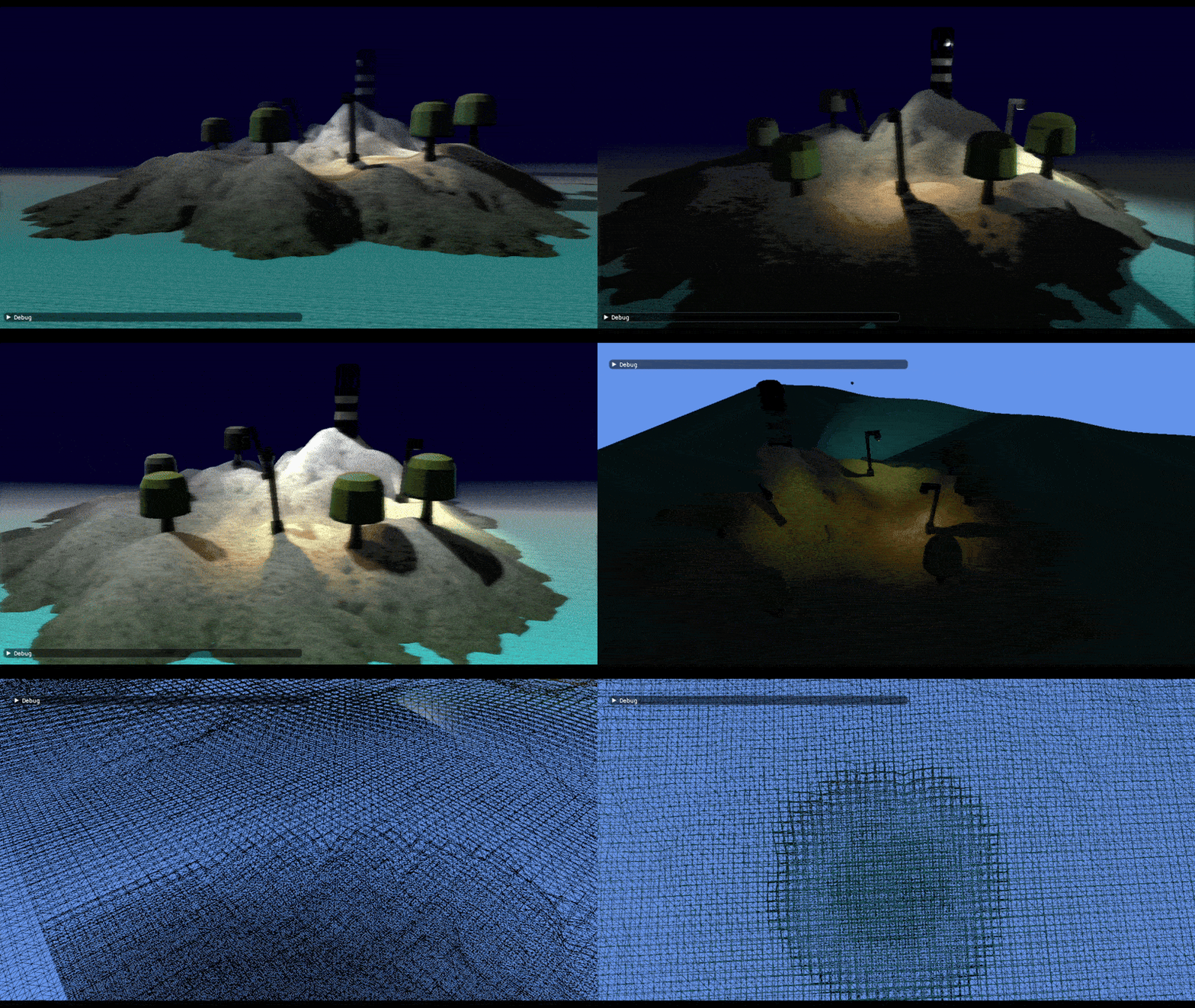
• Vertex manipulation to create terrain from a heightmap and wavy sea.
• Directional lights, spotlights, and point lights.
• Shadows created using shadowmaps.
• Bloom, fog, grayscale post processing shaders.
• Tessellation of meshes.

Light and Shadow:
My program features directional lights, spotlights, and point lights, as well as shadows casted via shadowmapping. Done by rendering the scene from the lights perspective as a depth check to a shadow map, one for each light.

The project also includes specular highlights for reflective surfaces like the lampposts and sea. Initially I had each light hold information about its specular power but later switched it to an input on the light pixel shader so that each object in the scene held its own specular power, which is more inline with real life as it should be a material property of how shiny the surface is, rather than a property of the light.

Post Processing Shaders:
My program features bloom, fog, and grayscale as part of a post processing pixel shader. Bloom specifically was created by rendering the scene to a texture, before undergoing four passes, which is done because the scene texture needs to be manipulated multiple ways for the bloom effect and therefore cannot be done during the initial render. The first pass uses a pixel shader that filters out pixels of low luminance, rounding them down to black and leaving only bright pixels on the texture. The next two passes are horizontal and vertical blur passes using the gaussian function for dynamic weights for neighbouring pixels, blurring the bright parts of the scene. Finally, the last pass adds the colour of the blurred light back onto the original scene texture to create blurred highlights around the light.

The bloom shader successfully creates a glow around the lit portion of the scene, with GUI controls for luminance threshold, blur radius, and strength. Although performance is not noticeably impacted by the post processing effects, a potential improvement could be to use compute shaders to improve efficiency of the blur passes by taking advantage of shared memory in a group to reduce sampling of the same pixel so many times.

Tessellation:
Both the terrain created from a heightmap and the vertex manipulated sea are tessellated, dynamically increasing the level of detail close to the camera while keeping low levels of detail in the distance, thereby adding detail without too much impact on performance. Framerate was measured with and without tessellation and the results showed that tessellation allowed for a much greater level of detail up close that would not have been possible without noticeably impacting performance not using tessellation.

Interested? Send me a message:

lemmiegames@gmail.com

lemmiegames@gmail.com